


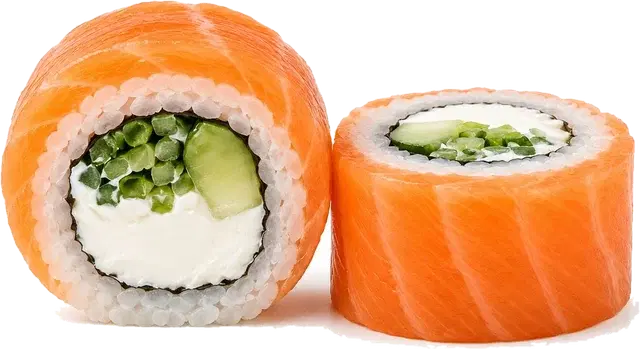
Philadelphia with salmon
8 pcs · 240 g
- Sushi rice90 g€0.28
- Fresh salmon40 g€1.12
- Cream cheese30 g€0.34
- Nori½ sheet€0.11
Develop new dishes, calculate cost, keep food cost under control, approve recipes and use up-to-date tech cards right in the kitchen.
From the first idea to a stable production process.
No credit card. Core features are free.
Philadelphia with salmon
8 pcs · 240 g
Modules covering the full cycle of running a sushi bar menu - from the recipe to the kitchen.
A new dish, proposed by the chef or the owner.
Composition, weights, technique, photos.
Cost price, food cost, margin.
Signed off by the chef or the owner.
The tech card printed, or on a tablet in the kitchen.
Modules covering the full cycle of running a sushi bar menu - from the recipe to the kitchen.
Development
The whole dish in one card: composition, weights, portions, method and photos. Copy an existing recipe, swap a few ingredients, and the new version is ready to cost.
Dish editor
California with shrimp
| Ingredient | Weight | Total |
|---|---|---|
| Cooked shrimp | 60 g | €1.68 |
| Avocado | 40 g | €0.36 |
| Sushi rice | 120 g | €0.48 |
| Nori | 0.5 sheet | €0.09 |
| Sesame | 5 g | €0.10 |
Calculation
Cost price, food cost and margin are worked out from weights and purchase prices rather than guesswork. You see the recommended price before the dish reaches the menu, and an updated one the moment supplier prices move.
Dish economics
Recalculated automatically
Change an ingredient's purchase price and every dish that uses it is recosted automatically.
Waste
For every ingredient you can record its purchase weight, price, waste percentage and actual yield - SushiFlow works out the real cost per gram for you.
1 kg of salmon → 82% usable yield → the real cost of 1 kg of clean product, worked out for you.
Real cost of the clean product
Salmon (skin-on fillet)
Purchased
1,000 g
€18.00
Usable yield
820 g
82%
Real cost of 1,000 g of clean product
€21.95
Waste is folded into every dish's cost price automatically.
Ingredients
A ready-made base of the ingredients a sushi bar actually uses - with categories, purchase prices and waste percentages. Add your own, search by name, and edit prices right in the list.
| Name | Category | Price | Waste |
|---|---|---|---|
| Salmon whole | €10.50 / kg | 23% | |
| Tuna fillet | €38.00 / kg | 12% | |
| Tiger shrimp | €16.00 / kg | 5% | |
| Avocado | €1.30 / pcs | 30% | |
| Brown sushi rice | €4.20 / kg | 0% | |
| Nori seaweed | €0.18 / pcs | 0% |
Approval
A recipe travels from draft to menu in the open: the chef builds the composition, the technologist checks the yield, the owner looks at the margin. The discussion stays on the dish itself rather than in a messenger thread.
Approval thread · Philadelphia with salmon
Added salmon 60 g, avocado 30 g. Food cost 28%, selling price €7.50. Ready for review, I think.
Yield 250 g, gross-to-net checks out. Portions are even. No notes from me.
Margin works for the seasonal menu. Approved, but let us set the price at €7.90.
Agreed. Fixing the price and uploading the final photo.
Changed the status to In menu. The recipe has gone to the kitchen.
Only the current approved version of the tech card reaches the kitchen.
Kitchen
The kitchen sees exactly what the station needs: the photo, exact weights and the order things go in. No prices, no margins, no drafts - and no printout that went stale last week.
Philadelphia with salmon
Composition
On top
Salmon60 g
Philadelphia with eel
Composition
On top
Unagi eel60 g
Philadelphia with avocado
Composition
On top
Avocado50 g
Philadelphia with tuna
Composition
On top
Tuna60 g
Marketing
A set is not just a list of rolls but a product of its own, with its own price and food cost. Build it from positions you already have and watch the weight, piece count and margin of the whole box as you go.
Sushi set builder
«Family evening» · preview
Philadelphia with salmon
8 pcs · 240 g · €2.14 cost · €7.50 price
California with shrimp
8 pcs · 230 g · €2.89 cost · €8.00 price
Vegetarian with avocado
8 pcs · 210 g · €1.42 cost · €5.50 price
Gunkan with tuna
4 pcs · 120 g · €2.05 cost · €6.00 price
Hot roll with salmon
8 pcs · 250 g · €2.46 cost · €8.50 price
AI visualisation
Coming soonAssemble a set and see how it could look on camera before you book a photographer. The visualisation is built from your own tech cards, so the picture shows the rolls you actually approved.
Set visualisation
Coming soonReference 1Reference 2Reference 3AI visualisation helps shape the concept of a future product and prepare for a real photo shoot.
Library
Coming soonRecipes stop living in one person's head: keep your own, publish the good ones and take other chefs’ into your library. A copied dish is recosted against your purchase prices straight away.
Library of chefs’ recipes
Coming soonDragon with eel
Chef A. Masko
Cost: €3.20
Copy
Spicy tuna
Chef O. Danyliuk
Cost: €2.45
Copy
Crunch with shrimp
Chef M. Hnatiuk
Cost: €2.90
Copy
Vegan set
Chef I. Levchuk
Cost: €7.85
Copy
When a recipe is copied, SushiFlow recosts it against your own establishment’s purchase prices.
Five clear stages every dish goes through in SushiFlow.
Start from a recipe in the catalogue, or build one from scratch.
Record the weight, purchase price, waste and the actual yield of each one.
SushiFlow works out the cost price, food cost, margin and a recommended selling price.
The team tastes the dish, leaves comments and signs off the final version.
The approved tech card is on the kitchen tablet the moment it is signed off.
Every role gets exactly the tool it needs day to day.
Keep everything you have developed in one place, and take inspiration from what the community is making.
Every recipe, version and photo you have made, in one workspace.
Copy another author’s recipe and SushiFlow adapts the cost to your prices.
Discussion, ratings and shared ideas. Arriving step by step.
Library of chefs’ recipes
Coming soonDragon with eel
Chef A. Masko
Cost: €3.20
Copy
Spicy tuna
Chef O. Danyliuk
Cost: €2.45
Copy
Crunch with shrimp
Chef M. Hnatiuk
Cost: €2.90
Copy
Vegan set
Chef I. Levchuk
Cost: €7.85
Copy
When a recipe is copied, SushiFlow recosts it against your own establishment’s purchase prices.
Start free and move up to the wider feature set when you need it.
To get started
Free
For getting to know the system, and for smaller projects.
Professional level
Pro
For professional chefs and working sushi bars.
Briefly: what the system does today, and what it costs.
SushiFlow is a single system for developing dishes, costing them, approving recipes and putting tech cards to work in a sushi bar — on your own, or with your whole team in one shared workspace.
No. The free plan lets you create your own tech cards, calculate cost and food cost, build sets and print cards. No card details required.
Recipe development, costing, waste accounting, the ingredient base, statuses, team workspaces, approval discussion and the kitchen display all work today. AI visualisation and the community library are still in progress — they are marked “Coming soon” on this page.
Yes. Alongside your personal recipes there is a shared team workspace: everything shared to it — ingredients, rolls and sets — is visible to every member, and any member can edit it. Your private content and the official catalogue stay separate. Start a team from the workspace switcher in the sidebar; other people join with a code you give them.
You enter your own purchase prices, and a base of the ingredients a sushi bar actually uses is already there, so you do not start from an empty list. Change a price and every dish that uses that ingredient is recosted automatically.
Each ingredient can carry a gross weight, a net weight and an actual yield. SushiFlow costs the clean product rather than the invoice: a kilo of salmon at 82% yield costs more than a kilo on the delivery note.
No. The kitchen display shows only dishes with the “In menu” status. Drafts, finished-but-not-launched and archived recipes never reach it.
The kitchen display opens from a link on a tablet — the photo, exact weights and the order things go in. No prices, no margins, no extra buttons.
The interface is in Ukrainian and English and can be switched at any time. The currency is chosen in settings and applies to every calculation.
Develop dishes that earn their place, approve recipes and hold the kitchen to one standard — all in SushiFlow.
From your first tech card to running the whole menu.